Back up your Search Console
data before Google forgets it.
Google Search Console keeps a rolling 16 months of your keyword data, then quietly deletes the oldest day. KeywordHistory backs everything up to BigQuery the moment you connect, so your SEO history is yours, forever.
Free plan available, no credit card required.
Dashboard
sc-domain:streamalive.comManaged
Data as of 16/05/2026
Total clicks
20,934
Total impressions
1,587,232
Average CTR
1.32%
Avg. position
23.1
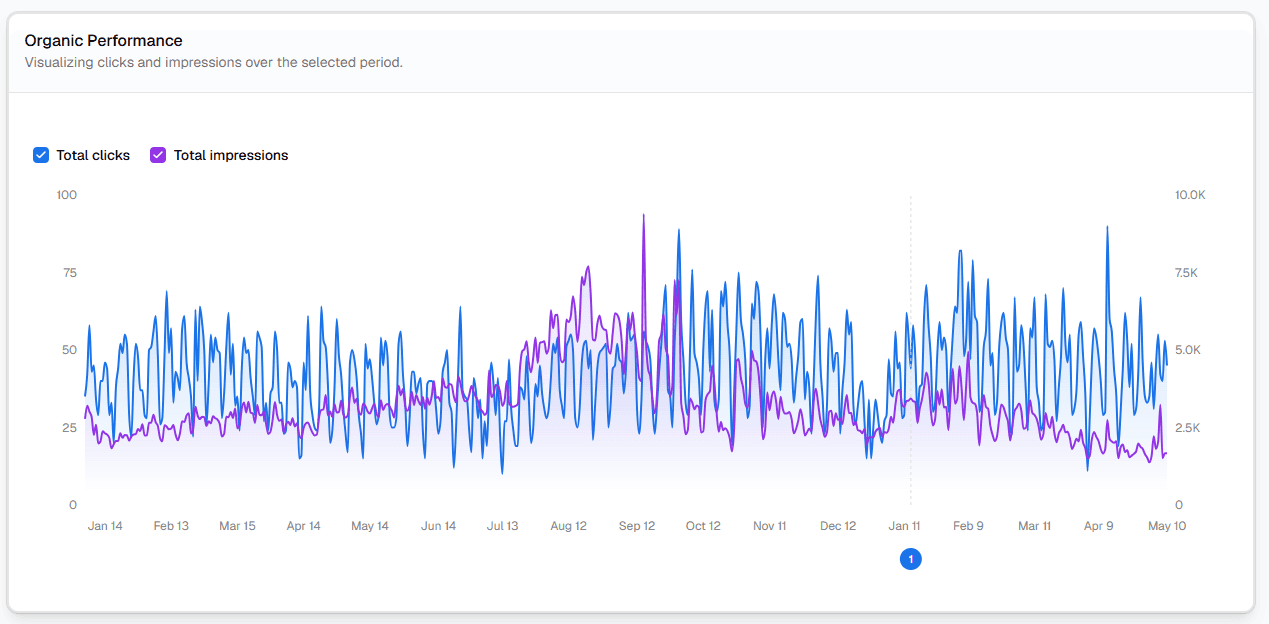
Organic Performance
Clicks and impressions over the selected period.
Position distribution
16 months on day one
Backfill kicks off the moment you connect Search Console. Maximum history Google allows, imported straight away.
Grows past the 16-month limit
Every day after backfill extends your dataset. Year-three YoY analysis becomes possible.
Annotations stay forever
Pin launches, redirects, and algo updates. They never roll off your timeline.
The 16-month problem
Every day, Google deletes the oldest day of your SEO history.
Search Console only retains 16 months. Last year's seasonality, the keyword that used to be your top performer, the run-up to your traffic peak. All of it falls off the back, quietly, without warning.
Without KeywordHistory
- Today's data only goes back 16 months
- Year-over-year comparisons miss seasonal anchors
- No record of keywords you used to rank for
- Past algorithm updates have no traffic context
With KeywordHistory
- 16 months backfilled on day one
- Every day after extends your archive forever
- Old keywords stay queryable indefinitely
- Annotations pin context to every chart, permanently
How it works
- Connect Search Console with Google OAuth
- KeywordHistory syncs daily into BigQuery
- Your data lives in your warehouse, or ours
- Query it forever, even after you stop subscribing
How it connects
Pick your setup. We'll meet you where you are.
KeywordHistory works with three different setups depending on how much of your own Google Cloud Platform (GCP)?Google Cloud Platform is Google's suite of cloud services, similar to Amazon AWS. The only part of it KeywordHistory uses is BigQuery, their cloud database. setup you already have.
What you do
- 1In Search Console, turn on bulk data export?A free Google feature that automatically copies your Search Console data into BigQuery every day. You flip one switch in GSC settings. and it will push your keyword data into your BigQuery database automatically.
- 2Connect KeywordHistory to your BigQuery?Google's cloud database. Think of it like a spreadsheet that can hold billions of rows.. We'll ask for your project ID and dataset name.
- 3Done. KeywordHistory reads your data directly from your database. Your data never passes through our servers.
More than a backup
Once your Search Console history is safe, the reports start to write themselves. Each one has its own page. Click to dig in.
Dashboard
Daily SEO at a glance
Keyword tracker
Pin and track target keywords
AI visibility
See LLM-driven traffic
CTR curve
Your real CTR by position
Cannibalization
Find self-competition
Striking distance
Page-2 quick wins
Intent clustering
Informational vs transactional
Brand vs non-brand
Strip vanity numbers
Annotations
Pin events to charts
Team workspace
Roles + per-site access
Historical data
Beat GSC's 16-month limit
BigQuery
Your warehouse, your rules
Historical data
16 months on day one. Forever after that.
The moment you connect Search Console, KeywordHistory imports the maximum 16 months of data Google will release. Then every daily sync extends your archive , past the rolling window, past the next algorithm update, past anywhere else you could store it.
- Full 16-month backfill the moment you connect
- Multi-year YoY analysis once you've been running a while
- Your data lives in BigQuery: yours, ours, or fully managed
Weekly hit list
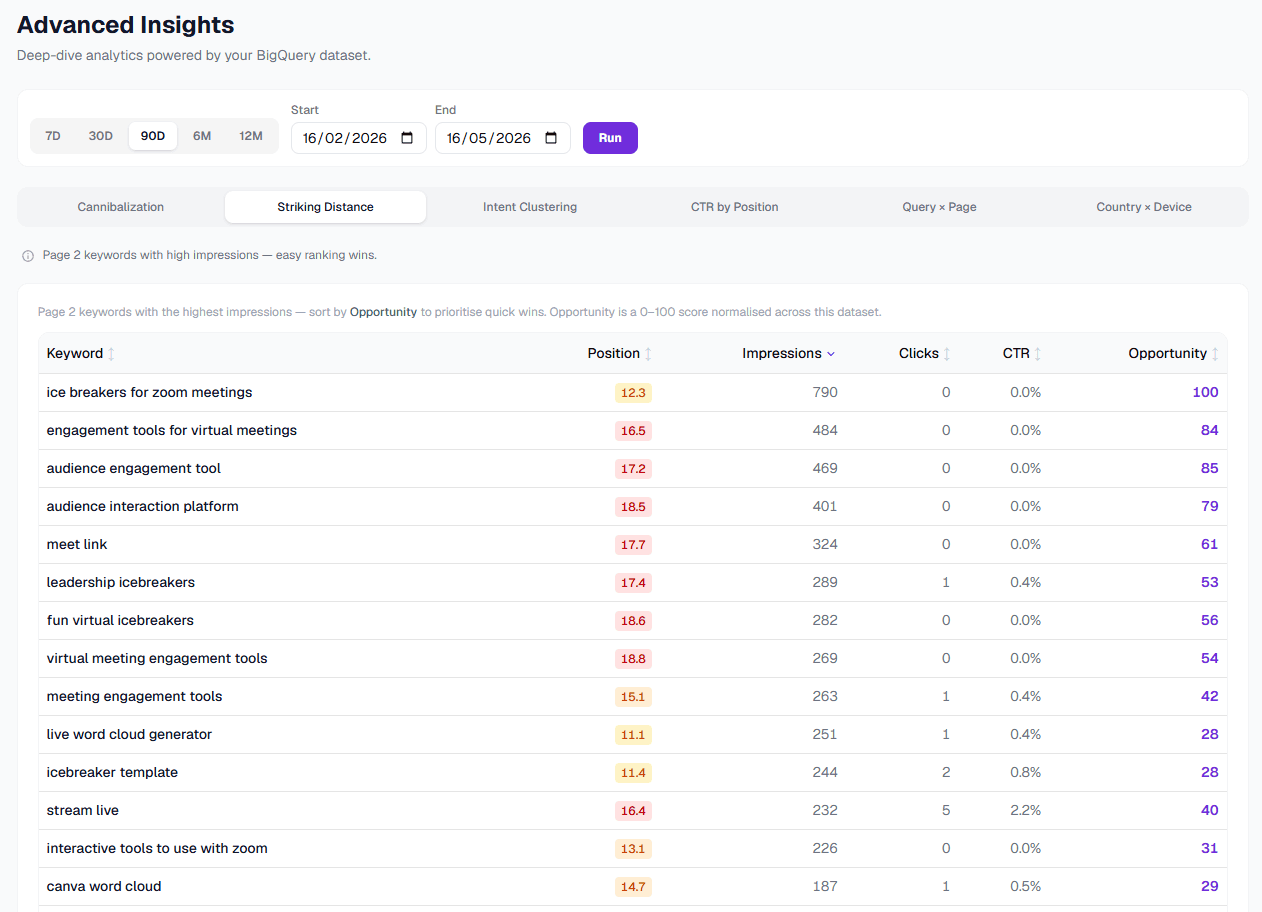
Five SEO wins a week, ranked by upside.
Striking distance + your real CTR curve = a prioritized weekly hit list. Each opportunity comes with measurable expected lift.
- Page-2 keywords with high impressions
- Sorted by click upside, not impressions
- Drill into the query, find the page, fix it
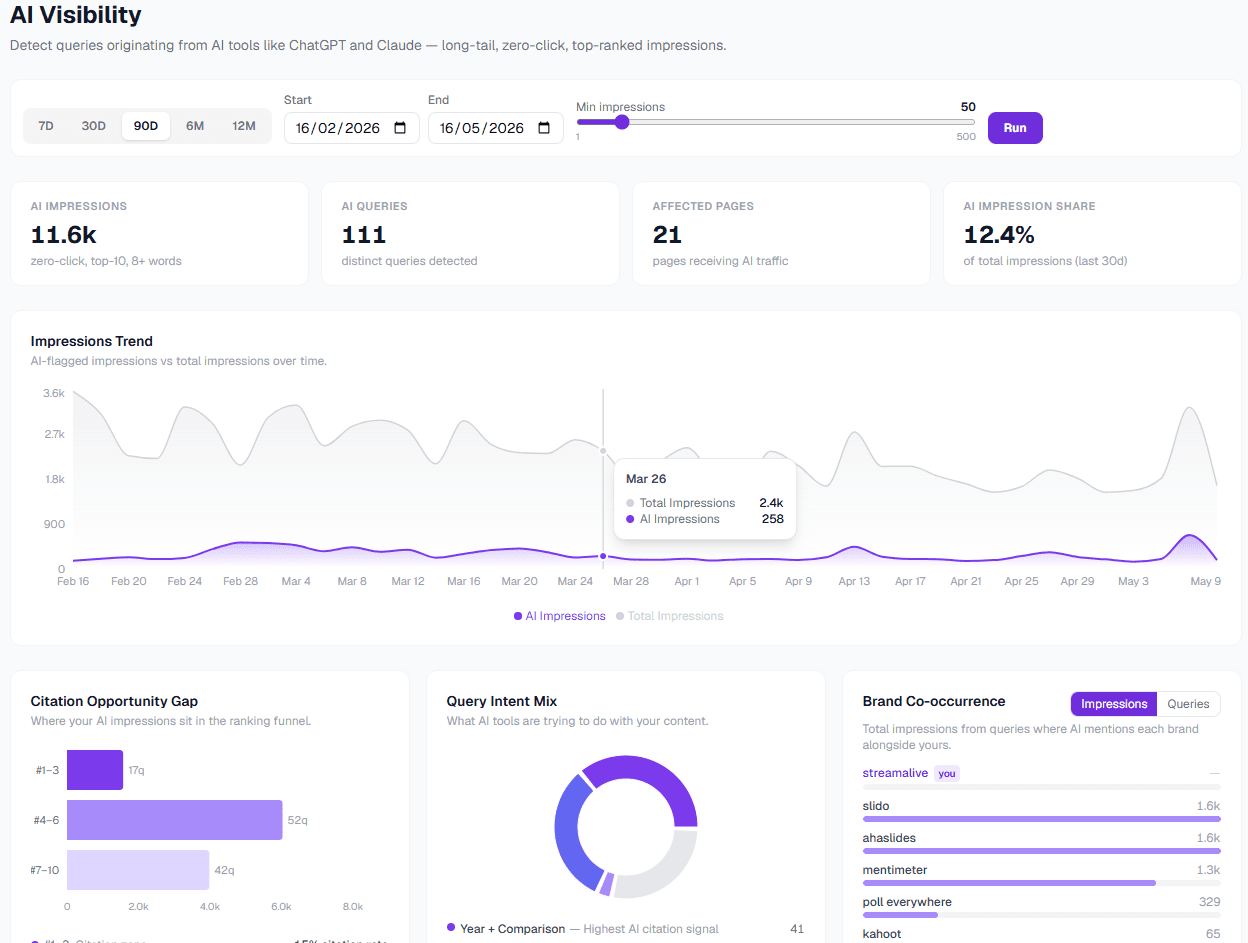
New: AI search
See ChatGPT and Claude traffic in your GSC data.
Long-tail, comparison-rich, year-specific, zero-click queries, the fingerprints of AI assistant traffic. Quantify zero-click risk, identify citation patterns.
- AI impression trend chart
- Topic clustering on AI-style queries
- Per-URL AI citation surface area
Built for everyone who lives in GSC
From solo founders to multi-client agencies. Find your fit.

Built by Peter Claridge
Made by someone who scaled organic search at Unmetric, eg innovations and StreamAlive.
I got tired of rebuilding the same dashboards in Google Data Studio every job. slow, no annotations, the 16-month window cutting off my analysis. So I built KeywordHistory.
Read the storyHonest pricing.
Free for one site. $12/year for the full product. $29/year for the team plan. No per-seat games.
See full pricingStart backing up your data today.
Every day you wait, Google deletes another day of your history. Two-minute setup, 16 months backfilled, free plan available.
Start free